
AI teleprompter & presentation assistant · Windows
Your material, the moment you need it.
Real-time answers for pitches, client calls and board questions, written from your own deck and notes. Invisible on Zoom, Google Meet and Teams screen share.
Free for 30 minutes. No card. Windows 10 and later.
The teleprompter
They see your slides. You see your next line.
Windows marks the overlay as protected content, so screen sharing and recording skip it. Everyone else sees the slide behind it.
- Free trial
- 30 min
- Of the real product. No card, and the clock starts on first use.
- Credit meters
- None
- Unlimited sessions and questions on every plan.
- Session caps
- None
- A presentation runs as long as it runs.
- Session records kept
- Zero
- No audio, screenshots, questions or answers are stored.
What it does
Four ways to get your next line.
One app, no suite. It writes from your material, and these are the four ways to ask it.
Live copilot
Ctrl+Shift+LPress once when someone asks a question. Your next lines appear, written from your own deck and notes.
Auto mode
Ctrl+Shift+DHands off the keyboard. It follows the conversation and keeps the next line in front of you.
Screenshot answers
Ctrl+Shift+SCapture the slide, spreadsheet or diagram on screen and get talking points about it.
Invisible overlay
Ctrl+Shift+HOn your monitor, not in the share. Zoom, Meet, Teams and recordings never show it.
Every screen
What it actually looks like.
The whole app, in the order you meet it. Real screens, not illustrations of them.
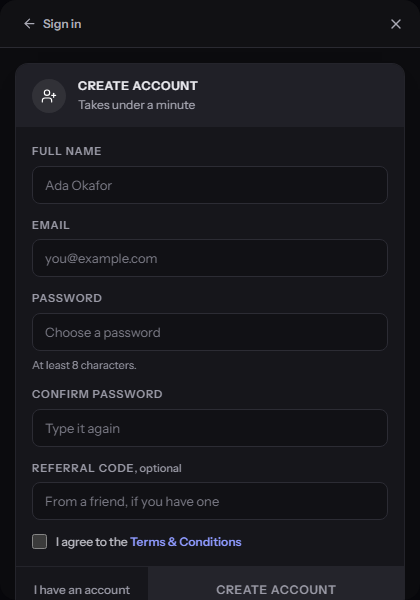
Make an account
Email, name, password. No card at this stage.
- Enter your email, name and a password
- Tick the terms box, then Create Account
- You land on the dashboard, already signed in
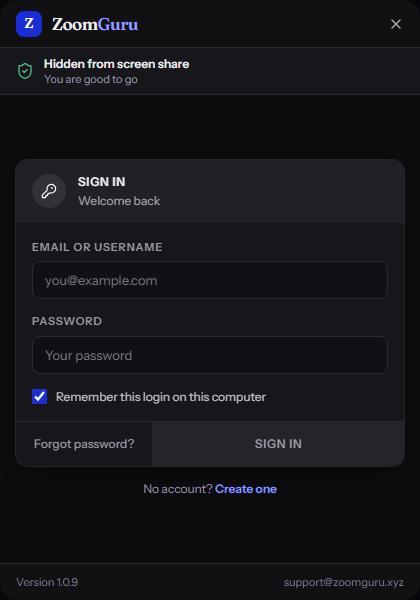
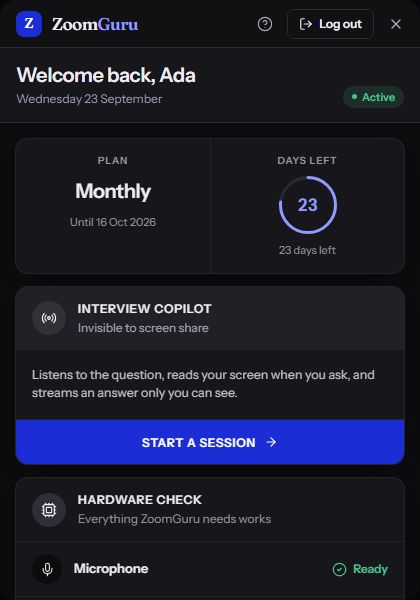
How it works
Set it up once. Then just talk.
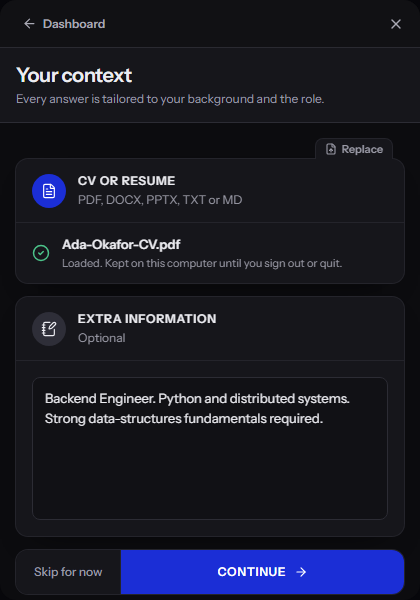
Load your material
Your deck, speaker notes, brief or report, as PDF, Word, PowerPoint, text or Markdown. Everything it writes afterwards comes from this.
Start the call
Zoom, Meet, Teams, a webinar, a room with a projector. The overlay is already on your screen and already hidden from the share.
Read your next line
Press a key when a question comes, or turn on auto mode and leave the keyboard alone. The lines appear while the question is still being asked.
Price
The best of them is also the cheapest.
Other tools bill in dollars, cap a session at two hours, or run a credit meter while you are mid-sentence. ZoomGuru does none of that, for less.
ZoomGuru
$29
(₦45,000) / month
- Plan
- Unlimited, monthly
- Metering
- None
- Computers
- 2 at a time
Parakeet AI
$74.90
2.6× our monthly price
- Plan
- Unlimited, monthly
- Difference
- 61% less with ZoomGuru
LockedIn AI
$54.99
1.9× our monthly price
- Plan
- Unlimited, monthly
- Difference
- 47% less with ZoomGuru
Cluely
$149.99
5.2× our monthly price
- Plan
- Undetectable, monthly
- Difference
- 80% less with ZoomGuru
List prices read from each vendor’s own pricing page on 27 August 2026. Vendors localise pricing by country and run promotions, so check theirs before relying on the gap. Our dollar figures are converted at ₦1,550 to the dollar — the naira amount in brackets is what Paystack charges.
Questions
The ones people actually ask.
- What is ZoomGuru?
- An invisible teleprompter and presentation assistant for Windows. It sits on top of your screen while you present or take questions, hears the question through your microphone, and writes what to say from your own deck, notes and documents while the other person is still talking.
- Can the other people on the call see it?
- No. The overlay is excluded from screen capture at the operating-system level, so it does not appear in a Zoom, Meet or Teams share, and it does not appear in a recording. Everyone else sees whatever is behind it.
- Who is it for?
- Anyone who presents their own material to other people. Founders pitching investors, consultants presenting to a client, sales teams running a demo, executives taking board questions, trainers and webinar hosts.